
Utiliser les collections de MLGTraffic
avec Traffic Screensaver
Cette page explique comment utiliser les collections de MLGTraffic avec Traffic Screensaver en allant plus loin que le défilement des séquences par défaut issues de la procédure standard d'installation.
| Choisir une ou plusieurs collections |
Le fichier roulement installé par défaut permet de voir défiler alternativement des trains des 5 collections de MLGTraffic (années 60, 81-85, XXIème siècle, privés et voie métrique).
Pour ne sélectionner qu'une ou plusieurs de ces collections, il faut aller dans le menu Options de la fenêtre de configuration :

Seules les
collections marquées par des coches ( )
vont défiler à l'écran.
)
vont défiler à l'écran.
Dans l'exemple ci-dessus, nous verrons donc les années 60, 81-85 et le XXIème siècle, mais ni les privés ni la voie métrique. Par défaut, après l'installation, toutes les collections sont cochées.
Pour sélectionner ou déselectionner une collection, il suffit de cliquer dessus dans le menu Option. Lors de l'affichage suivant de ce menu, le nouvel état est affiché. Le menu disparait lors du clic. Pour sélectionner / désélectionner plusieurs collections, il faut ouvrir le menu à chaque fois.
| Les différents fichiers des collections |
Les fichiers de Matériel Roulant
Les collections de dessins sont fournies sous la forme d'un jeu de deux fichiers qui contient indistinctement l'ensemble des collections :
MLGTraffic.stb : le fichier matériel roulant,
MLGTraffic.tvl : la librairie contenant les images.
Attention, le nom de ces fichiers a changé depuis octobre 2004 (ancien nom : sncfsqx).
Pour faire circuler les trains dans Traffic, il faut de plus des fichiers roulement. Voici comment ils sont organisés :
sncfSQX_mvt.ttt : le fichier mouvement principal, qui enchaîne les collection (les 8 autres fichiers doivent être présents lors de son utilisation).
sncfS_mvt.ttt : le fichier mouvement pour la collection SNCF Sixties,
sncfS_def.ttt : doit être présent quand sncfS_mvt.ttt est utilisé,
sncfQ_mvt.ttt : le fichier mouvement pour la collection SNCF 81-85,
sncfQ_def.ttt : doit être présent quand sncfQ_mvt.ttt est utilisé,
sncfX_mvt.ttt : le fichier mouvement pour la collection SNCF XXIème siècle,
sncfX_def.ttt : doit être présent quand sncfX_mvt.ttt est utilisé,
prives_mvt.ttt : le fichier mouvement pour la collection CF Privés,
sncfVE_mvt.ttt : le fichier mouvement pour la collection SNCF voie métrique.
Comme vu au chapitre précédent, l'installation standard utilise le fichier enchaînant toutes les collections. Il est possible de se limiter à une collection sans passer par le menu Options. Pour cela, allez dans la fenêtre Configuration de Traffic et choisissez le fichier correspondant à la collection désirée dans le champ Nom du fichier Roulement (n'utilisez que les fichiers listés en gras ci-dessus).
| Fonctionnalités associées aux dessins des collections |
Les pages de ce site consacrées aux différentes collections listent les différents dessins composant celles-ci. En regard de certains dessins apparaissent de petits symboles liés aux fonctionnalités liées à ces dessins pour leur utilisation avec Traffic.
Voici la liste de ces symboles et des fonctionnalités associées :
l'icône
 signalise
les matériels auxquels est associée une animation d'ouverture et fermeture des
portes.
signalise
les matériels auxquels est associée une animation d'ouverture et fermeture des
portes.
l'icône
 signalise les matériels auxquels est associée une animation des roues ou
des bielles.
signalise les matériels auxquels est associée une animation des roues ou
des bielles.
l'icône
 signalise les matériels auxquels est associée une animation couplage.
l'icône
 signalise les matériels auxquels est associée une animation soufflets.
l'icône
 signalise les matériels auxquels est associée une animation cables.
l'icône
 signalise les matériels auxquels est associée une animation pantographes.
La présence d'une icône en face d'un dessin indique qu'une macro Traffic associée avec la fonctionnalité indiquée par l'icône a été créée pour ce dessin.
Pour des raisons pratiques, ces macros n'ont pas été reproduites dans ce site. Il est possible de les voir en double-cliquant sur le dessin dans l'éditeur de Matériel Roulant de Traffic. Une fenêtre de ce type apparaît alors :
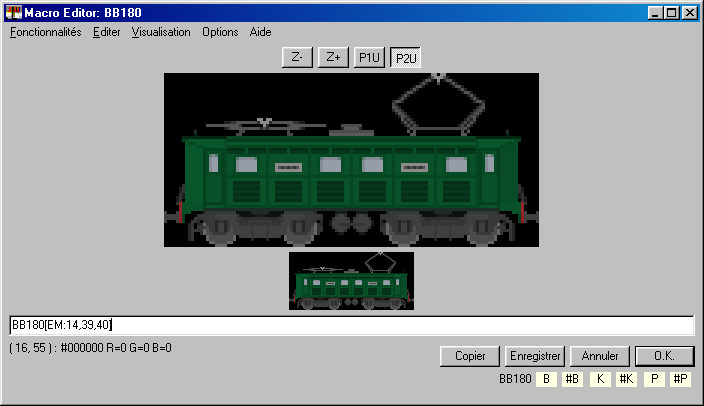
La macro qui assure la fonctionnalité pantographes associée à cette BB 1-80 figure après le nom du dessin dans le champ blanc. Il s'agit de [EM:14,39,40].
Ce n'est pas forcément très parlant (voir le guide des fonctionnalités de Traffic Screensaver pour plus de détails), ce qu'il suffit pour l'instant de savoir est que si vous voulez copier ce dessin dans une autre collection, il faut également copier la macro (forcément dessin par dessin par copier coller dans cette fenêtre).
Attention : Ces animations peuvent utiliser d'autres dessins (portes, roues,...) auxquels peuvent également être associées des macros, sans lesquels l'animation ne marchera pas.
 Télécharger tous les dessins d'animation des collections
Il existe également des dessins de chargements, de conteneurs, de voie et de décors, qui ne sont pas reproduits sur ce site. Ces dessins peuvent être téléchargés ici :
Télécharger
les dessins divers (chargements, conteneurs, voie)
 Dernière MAJ : 03/10/2004
 Retour à l'accueil